
English
VitePress Blog SEO in Practice: A Complete Guide from Configuration to Verification

Preface
After setting up the VitePress blog, the next important task is to get SEO right. This article documents the entire process of configuring a complete SEO solution for my blog, including:
Basic meta tags (description, keywords, author)
Open Graph tags (social media sharing)
Twitter Cards
Article structured data (publish time, tags)
Page-level override logic
Verify the configuration using debugging tools.
Step 1: Basic SEO Configuration
at .vitepress/config.mts In it, first configure the basic site information:
typescript
// .vitepress/config.mts
import { defineConfig } from 'vitepress'

export default defineConfig({
  title: 'Blog of Fishfinal',
  description: 'A note on Golang engineering practices from frontline development',

  head: [
    // global keywords
    ['meta', { name: 'keywords', content: 'Golang, Kubernetes, PostgreSQL, Redis, Backend Architecture, Database Tuning, Automated Operations, DevOps, Linux, GitHub Actions, VitePress, Tech Blog' }],
    // Global Author
    ['meta', { name: 'author', content: 'Endless Fish Tail' }],
  ]
})
Step 2: Configure Open Graph (Social Sharing)
Open Graph tags determine how your article appears when shared on platforms such as Facebook, WeChat, and LinkedIn.
typescript
head: [
  // ... Existing configuration

  // Open Graph basic tags
  ['meta', { property: 'og:type', content: 'website' }],
  ['meta', { property: 'og:site_name', content: 'Fish Tail Endless Blog' }],
  ['meta', { property: 'og:image', content: 'https://image.fishfinal.com/hero/default-social-share.jpg' }],

  // Twitter Cards
  ['meta', { name: 'twitter:card', content: 'summary_large_image' }],
]
Step 3: Implement page-level coverage
Different articles require different keywords and share images, and need to use transformHead Implement dynamic coverage:
typescript
transformHead({ pageData }) {
  const { title, description, frontmatter, relativePath } = pageData
  const metas = []

  // Page-level author override
  if (frontmatter.author) {
    metas.push(['meta', { name: 'author', content: frontmatter.author }])
  }

  // Page-level keywords override
  if (frontmatter.keywords) {
    metas.push(['meta', { name: 'keywords', content: frontmatter.keywords }])
  }

  // Dynamically generate page URL
  const pageUrl = `https://fishfinal.com/${relativePath.replace(/\.md$/, '.html')}`

  // Open Graph dynamic tags
  const ogTitle = frontmatter.title || title || 'Fishfinal\'s Blog'
  metas.push(['meta', { property: 'og:title', content: ogTitle }])
  metas.push(['meta', { property: 'og:url', content: pageUrl }])

  const ogDescription = frontmatter.description || description || 'A Golang engineering practice note from frontline development'
  metas.push(['meta', { property: 'og:description', content: ogDescription }])

  // Article pages use the article type.
  if (relativePath !== 'index.md') {
    metas.push(['meta', { property: 'og:type', content: 'article' }])
  }

  // Article images as sharing images
  if (frontmatter.image) {
    metas.push(['meta', { property: 'og:image', content: frontmatter.image }])
    metas.push(['meta', { name: 'twitter:image', content: frontmatter.image }])
  }

  // Article publication time
  if (frontmatter.createdAt) {
    metas.push(['meta', { property: 'article:published_time', content: frontmatter.createdAt }])
  }

  // Article tags
  if (frontmatter.tags && frontmatter.tags.length) {
    metas.push(['meta', { property: 'article:tag', content: frontmatter.tags.join(', ') }])
  }

  return metas
}
Step 4: Configure Frontmatter in the article
Each article can customize its SEO information via frontmatter:
yaml
---
layout: blog-post
title: npm audit fix --force infinite loop trap: a story that almost made me give up on VitePress 2.x
description: From npm audit warnings, to running --force to downgrade VitePress and causing the project to crash, and then to discovering the truth behind the infinite loop.
tags: [npm, audit, vitepress, troubleshooting]
keywords: npm audit, npm audit fix --force, VitePress downgrade, npm security vulnerabilities
createdAt: 2026-06-14T11:26:00+08:00
image: https://image.fishfinal.com/hero/0cc175b9c0f1b6a831c399e269772661.jpg
---
Step 5: Verify that the configuration takes effect.
Method 1: Browser Developer Tools
Press F12 to open developer tools, and run in Console:
javascript
// View all meta tags
[...document.querySelectorAll('meta')].forEach(m => {
  const name = m.getAttribute('name') || m.getAttribute('property')
  if (name) console.log(`${name}: ${m.getAttribute('content')}`)
})
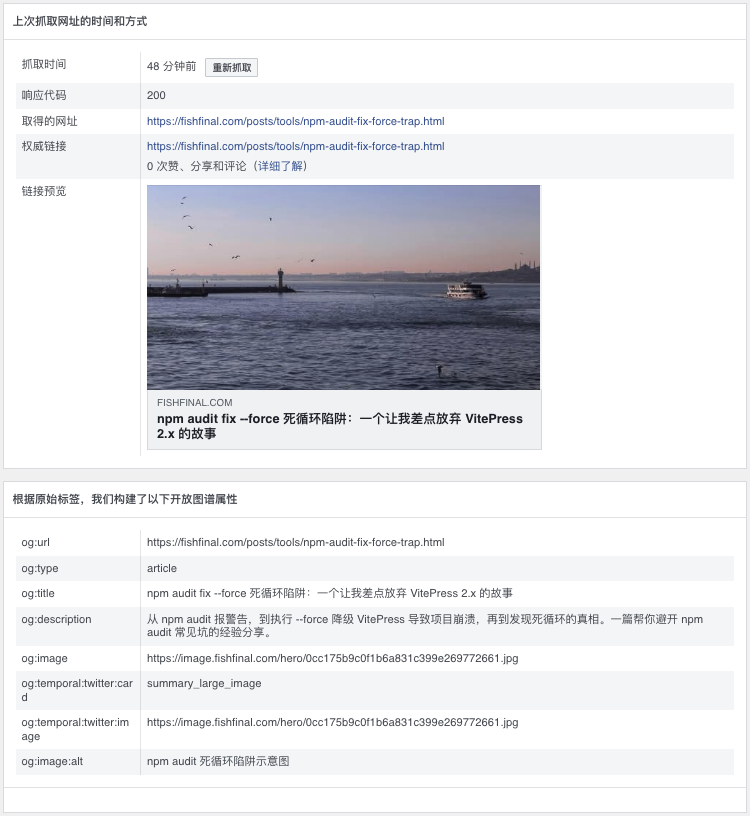
Method 2: Facebook Debugger (Recommended)
Visit Facebook Sharing Debugger, enter the article link, and you can:
Check whether the Open Graph tags are parsed correctly
Preview the share card effect
Clear Facebook cache and force a re-crawl
Method 3: Twitter Card Validator
Use Twitter Card Validator Verify the Twitter sharing effect.
Verification result example
After configuration is complete, the crawl result displayed by Facebook Debugger:
| Attribute | value | Status |
|---|---|---|
| og:title | Article title | ✅ |
| og:type | article | ✅ |
| og:image | Image URL | ✅ |
| og:description | Article description | ✅ |
| Response code | 200 | ✅ |
Frequently Asked Questions
Q1: What should I do if the configuration does not take effect after configuration?
Check the following points:
Rebuild the project:
npm run docs:buildClear CDN cache (if any)
Use Facebook Debugger and click "Scrape Again".
Q2: og:image image not displaying?
Ensure the image URL is publicly accessible.
Recommended image size: 1200×630 pixels
Keep the image size within 5MB.
Q3: Do the homepage and article page need to be distinguished by type?
Suggested distinction:
Homepage usage
og:type: websiteArticle page usage
og:type: article
In this way, social media will display content in a more suitable manner.
Summary
A complete SEO configuration includes three levels:
| level | content | Effect |
|---|---|---|
| Base layer | title、description、keywords、author | Search Engine Optimization |
| Social layer | Open Graph、Twitter Cards | Social media sharing performance |
| structural layer | article:published_time, article:tag | Content structuring |
After configuration is complete, your blog will have:
✅ Better search engine visibility
✅ Beautiful social media sharing card
✅ Standardized structured content data