
Appearance
如何通过扩展默认的 VitePress 主题实现博客的归档功能

1. 为什么需要归档功能?
随着博客文章越来越多(目前已有 30+ 篇),读者很难快速找到历史文章。侧边栏只能展示有限的文章列表,而归档页面可以:
- 按年份分组,一目了然
- 倒序排列,最新文章优先
- 展示标题 + 日期 + 描述,方便检索
本文将分享如何通过扩展 VitePress 默认主题,实现一个完整的归档功能。
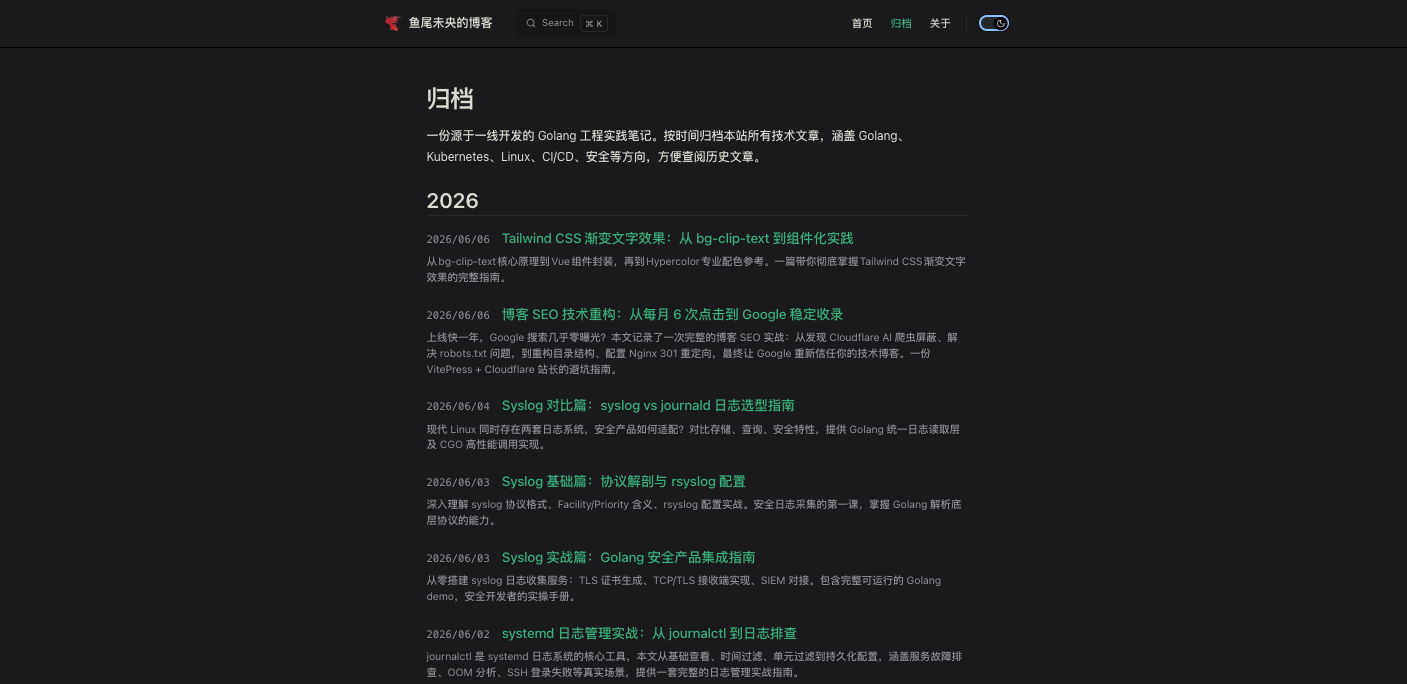
最终效果:访问 /archive 页面,按年份分组展示所有文章。
2. 整体方案设计
┌─────────────────┐
│  文章 .md 文件   │
│  + createdAt    │
└────────┬────────┘
│ 构建时扫描
▼
┌─────────────────┐
│ generateArchive │
│     Data.js     │
└────────┬────────┘
│ 生成 JSON
▼
┌─────────────────┐
│ archiveData.json│
└────────┬────────┘
│ 导入
▼
┌─────────────────┐
│   Archive.vue   │
│  (扩展主题组件)  │
└────────┬────────┘
│ 渲染
▼
┌─────────────────┐
│   归档页面       │
│  /archive.html  │
└─────────────────┘核心思路:
- 每篇文章的 frontmatter 中必须包含
createdAt字段 - 构建时扫描所有文章,提取元数据生成 JSON 文件
- 归档页面组件直接导入 JSON 数据并渲染
3. 第一步:规范化文章元数据
3.1 统一添加 createdAt 字段
在每篇文章的 frontmatter 中添加 createdAt(ISO 8601 格式):
yaml
---
title: '文章标题'
description: '文章描述'
createdAt: 2026-06-07T16:30:00+08:00
---
为什么用 ISO 8601?
- 国际标准,所有编程语言原生支持
- 包含时区信息,避免歧义
- 字符串排序即时间排序
3.2 从 Git 历史获取创建时间(可选)
如果你需要批量获取历史文章的创建时间:
bash
# 查看某个文件的首次提交时间
git log --follow --format=%ai --reverse <文件路径> | head -1输出示例:2026-06-07 16:30:00 +0800
手动转换为 ISO 8601:2026-06-07T16:30:00+08:00
4. 第二步:构建脚本生成归档数据
4.1 安装依赖
bash
npm install gray-matter --save-dev4.2 创建脚本自动生成归档数据脚本
该脚本将在构建时扫描所有文章,提取元数据生成 JSON 文件
js
import fs from 'fs'
import path from 'path'
import { fileURLToPath } from 'url'
import matter from 'gray-matter'

const __dirname = path.dirname(fileURLToPath(import.meta.url))
const docsRoot = path.resolve(__dirname, '..')
const postsRoot = path.resolve(docsRoot, 'posts')

// 递归获取所有 .md 文件
function getAllMdFiles(dir, fileList = []) {
  const files = fs.readdirSync(dir)
  files.forEach(file => {
    const filePath = path.join(dir, file)
    const stat = fs.statSync(filePath)
    if (stat.isDirectory()) {
      getAllMdFiles(filePath, fileList)
    } else if (file.endsWith('.md')) {
      fileList.push(filePath)
    }
  })
  return fileList
}

// 解析 frontmatter
function parseFrontmatter(filePath) {
  const content = fs.readFileSync(filePath, 'utf-8')
  const { data } = matter(content)
  return data
}

function generateArchiveData() {
  const mdFiles = getAllMdFiles(postsRoot)
  const articles = []

  mdFiles.forEach(filePath => {
    const relativePath = path.relative(postsRoot, filePath)
    const fm = parseFrontmatter(filePath)

    // 必须有 createdAt 才纳入归档
    if (!fm.createdAt) {
      console.warn(`⚠️ 缺少 createdAt: ${relativePath}`)
      return
    }

    // 生成 URL
    const url = `/posts/${relativePath.replace(/\.md$/, '.html')}`

    articles.push({
      title: fm.title || path.basename(filePath, '.md'),
      description: fm.description || '',
      createdAt: fm.createdAt,
      url: url
    })
  })

  // 按 createdAt 倒序排序
  articles.sort((a, b) => new Date(b.createdAt) - new Date(a.createdAt))

  // 写入到 .vitepress 目录
  const outputPath = path.resolve(docsRoot, '.vitepress/archiveData.json')
  fs.writeFileSync(outputPath, JSON.stringify(articles, null, 2))
  console.log(`✅ 已生成归档数据: ${outputPath} (${articles.length} 篇文章)`)
}

generateArchiveData()
4.3 集成到构建流程
修改 package.json:
json
{
  "name": "your-blog",
  "type": "module",
  "scripts": {
    "docs:build": "node docs/scripts/generateArchiveData.js && vitepress build docs",
    "docs:dev": "vitepress dev docs"
  }
}
5. 第三步:创建 Archive.vue 组件
5.1 组件位置
创建 docs/.vitepress/theme/components/Archive.vue
5.2 完整组件代码
vue
<script setup lang="ts">
import { computed } from 'vue'
import { useRoute, useData } from 'vitepress'
import { Content } from 'vitepress'
import archiveData from '~/.vitepress/archiveData.json'

const route = useRoute()
const { theme } = useData()
const pageName = computed(() =>
  route.path.replace(/[./]+/g, '_').replace(/_html$/, '')
)

const articles = archiveData

// 按年份分组
const postsByYear = computed(() => {
  const groups: Record<string, any[]> = {}

  for (const article of articles) {
    if (!article.createdAt) continue
    const year = new Date(article.createdAt).getFullYear().toString()
    if (!groups[year]) groups[year] = []
    groups[year].push(article)
  }

  return Object.entries(groups).sort((a, b) => Number(b[0]) - Number(a[0]))
})

// 格式化日期
function formatDate(isoString: string): string {
  const date = new Date(isoString)
  return date.toLocaleDateString('zh-CN', {
    year: 'numeric',
    month: '2-digit',
    day: '2-digit'
  })
}
</script>

<template>
  <div class="VPDoc">
    <div class="container">
      <div class="content">
        <div class="content-container">
          <main class="main">
            <Content class="vp-doc" />
          </main>

          <!-- 归档列表 -->
          <div v-if="postsByYear.length === 0" class="archive-empty">
            暂无文章
          </div>
          <div v-else class="archive-container">
            <div v-for="[year, posts] in postsByYear" :key="year" class="archive-year">
              <h2>{{ year }}</h2>
              <ul>
                <li v-for="post in posts" :key="post.url">
                  <a :href="post.url">
                    <span class="post-date">{{ formatDate(post.createdAt) }}</span>
                    <span class="post-title">{{ post.title }}</span>
                  </a>
                  <p v-if="post.description" class="post-description">
                    {{ post.description }}
                  </p>
                </li>
              </ul>
            </div>
          </div>
        </div>
      </div>
    </div>
  </div>
</template>

<style scoped>
.archive-container {
  margin-top: 32px;
}

.archive-year {
  margin-bottom: 48px;
}

.archive-year h2 {
  font-size: 28px;
  font-weight: 600;
  margin-bottom: 16px;
  padding-bottom: 8px;
  border-bottom: 1px solid var(--vp-c-divider);
}

.archive-year ul {
  list-style: none;
  padding: 0;
  margin: 0;
}

.archive-year li {
  margin-bottom: 24px;
}

.archive-year li a {
  display: flex;
  align-items: baseline;
  gap: 16px;
  text-decoration: none;
  font-size: 18px;
  font-weight: 500;
  color: var(--vp-c-brand-1);
  transition: color 0.2s;
}

.archive-year li a:hover {
  color: var(--vp-c-brand-2);
}

.post-date {
  flex-shrink: 0;
  font-size: 14px;
  font-weight: 400;
  color: var(--vp-c-text-2);
  font-family: monospace;
}

.post-title {
  flex-grow: 1;
}

.post-description {
  margin: 8px 0 0 0;
  font-size: 14px;
  color: var(--vp-c-text-2);
  line-height: 1.5;
}

.archive-empty {
  text-align: center;
  padding: 48px 0;
  color: var(--vp-c-text-2);
}
</style>
5.3 注册组件
在 docs/.vitepress/theme/index.ts 中:
typescript
import DefaultTheme from 'vitepress/theme'
import Archive from './components/Archive.vue'

export default {
  extends: DefaultTheme,
  enhanceApp({ app }) {
    app.component('Archive', Archive)
  }
}
5.4 创建归档页面
创建 docs/archive.md:
markdown
---
layout: archive
sidebar: false
aside: false
title: '归档'
description: '按年份归档本站所有技术文章'
---

# 归档

按年份归档本站所有技术文章
6. 遇到的坑及解决方案
6.1 路径引用问题
错误:Could not resolve "../.vitepress/archiveData.json"
原因:相对路径计算错误
解决方案:使用 ~/.vitepress/archiveData.json(VitePress 别名)
6.2 MutationObserver is not defined
原因:组件在服务端渲染时尝试访问浏览器 API
解决方案:将浏览器 API 调用放到 onMounted 中(不影响功能可忽略)
7. 最终效果
构建完成后,访问 /archive 页面:
2026
├── 2026-06-07  如何通过扩展 VitePress 主题实现归档功能
├── 2026-06-06  博客 SEO 技术重构:从每月 6 次点击到 Google 稳定收录
├── 2026-06-03  Syslog 基础篇:协议解剖与 rsyslog 配置
└── ...

2025
├── 2025-12-01  Golang 项目生产环境完整部署方案
├── 2025-08-15  解决 Docker Desktop Kubernetes EOF 错误
└── ...
8. 总结与扩展
8.1 可复用的模式
这套方案的核心思想可以推广到其他场景:
| 功能 | 类似方案 |
|---|---|
| 标签云 | 扫描所有文章,提取 tags 字段 |
| RSS 生成 | 提取文章元数据生成 XML |
| 相关推荐 | 根据标签/关键词推荐相似文章 |
8.2 未来可扩展的方向
- 标签归档:按标签分组展示文章
- 搜索功能:基于元数据实现本地搜索
- 文章统计:展示总文章数、总字数等
8.3 相关资源
- VitePress 官方文档 - 主题扩展
- gray-matter - Frontmatter 解析库
- ISO 8601 时间格式
如果你在实现过程中遇到任何问题,欢迎通过下面方式联系我。