
English
Do not let multilingual SEO go to waste: correct implementation of hreflang alternate tags in VitePress

Background: When the primary language meets historical baggage
If you built a multilingual site with VitePress and painstakingly translated all the content, only to find that the corresponding language versions cannot be found in Google or Bing, or even that the two versions are competing with each other for rankings, then you have most likely missed an extremely critical SEO tag:hreflang.
Before diving into the technical side, I want to first talk about the historical baggage of this blog.
My blog initially only has Chinese content, and by default the path without a prefix is the main language (https://fishfinal.com/). During later refactoring, to move toward internationalization, I introduced VitePress i18n and added an English version (/en/).
这时就面临一个尴尬的架构问题:如果我此时把主语言(x-default) Forcibly switching to English means all Chinese articles need to be moved to /zh/ In this case, not only is website construction extremely costly, but it will also cause all old Chinese links previously indexed by search engines to return 404, completely disrupting the existing SEO index.
Therefore, in order to take historical inclusion into account,I still used Chinese as the current x-default(Fallback page).
💡 Tips for new site administrators: If your blog is Brand new site, ready to implement multilingual support directly. Strongly recommend placing English in the default root directory (/), put the Chinese text into /zh/ below, and will x-default Point to English. This better conforms to common international standards. But for an existing old site like mine, keeping the original primary language as a fallback is the safest choice.
Today we are going to talk about why multilingual sites must add hreflang what role it actually plays in the eyes of search engines, and how to elegantly and dynamically implement it in VitePress.
I. Why do search engines act foolishly?
Suppose you have an article about [MinIO Compilation and Deployment], with a Chinese version and an English version. If you make no declaration, when search engine crawlers crawl these two pages, they will face an awkward situation:
Content is almost identical: In the eyes of search engines, these two pages are highly similar and may be judged as [duplicate content].
Self-competition: When Chinese users search for related keywords, Google may rank English pages first; when English users search, it instead shows Chinese pages.
mutually dilute weights: Multiple similar URLs split backlinks and page authority, so none of them can rank at the top.
No hreflang, search engines can only rely on their own language detection models to guess, and the accuracy of those guesses is not stable, especially with Simplified and Traditional Chinese, or regional variants (such as zh-CN and and zh-TW)above.
II. What exactly is hreflang?
In short,hreflang Alternative tags tell search engines:This page has versions for other languages/regions, their addresses are here, please recommend them to users of the corresponding languages.
It has three core functions:
Precise targeting Push Chinese pages to Chinese users and English pages to English users to improve click-through and conversion rates.
Avoid self-competition: Clearly tell search engines [these are peer-level alternative versions, not plagiarism], thereby protecting page authority.
Optimize target market experience In search results, directly display titles and summaries that match the user's native language.
⚠️ Important Notice:hreflang Yes Signal rather than Instruction Search engines will take it into account, but which version is ultimately displayed is still determined by the algorithm of the search engine.
III. Common Misconception: Can canonical replace hreflang?
Absolutely not. This is the pitfall that many developers are most likely to fall into.
canonical(Canonical Tag): Its function is [merge]. When your website has multiple identical URLs (for example with?the URL of the parameter), you usecanonicalTell the search engine: [These are all the same page; please count all the weight toward the main URL.]hreflang(Alternative label): Its function is same-level replacement. The Chinese and English versions are independent and equal, each serving users of different languages; they are not in a mutually replacing relationship.
If mistakenly the Chinese page's canonical Linking to the English page will cause the Chinese page to disappear completely from the index.
IV. Correct implementation approach in VitePress
Configure in VitePress hreflang, the most intuitive approach is to config.mts of head Hardcode directly in the array; but if you want a permanent solution, you should use the hooks provided by VitePress to generate dynamically.
1. Basic version: hardcoded example
Suppose your primary domain is https://yourdomain.com The article path is /posts/xxx.html. The URL structures for Chinese and English are as follows:
Chinese version:
https://yourdomain.com/posts/xxx.htmlEnglish version:
https://yourdomain.com/en/posts/xxx.html
You can config.mts Directly inject into:
typescript
// .vitepress/config.mts
export default defineConfig({
  // ... other configuration
  head: [
    // ... Other tags (such as favicon, etc.)
    [
      'link',
      {
        rel: 'alternate',
        hreflang: 'zh-CN',
        href: 'https://yourdomain.com/posts/xxx.html'
      }
    ],
    [
      'link',
      {
        rel: 'alternate',
        hreflang: 'en',
        href: 'https://yourdomain.com/en/posts/xxx.html'
      }
    ],
    [
      'link',
      {
        rel: 'alternate',
        hreflang: 'x-default',
        href: 'https://yourdomain.com/en/posts/xxx.html' // Suggestion: the fallback page for a new site is usually set to English
      }
    ]
  ]
})
(Note: Although this method is simple, it If your blog has dozens or hundreds of articles, hardcoding is simply a disaster., every time an article is added, the configuration must be changed.)
2. Advanced version: use transformHead Dynamic Generation (Production-grade)
To address the pain point of hardcoding, we can use what VitePress provides transformHead Hook, based on the current page relativePath Dynamically generate multilingual labels. Below is the configuration solution in the actual production environment:
typescript
// .vitepress/config.mts
import { defineConfig, HeadConfig } from 'vitepress';

export default defineConfig({
  // ... other configuration
  transformHead({ pageData }) {
    const { frontmatter, relativePath } = pageData;
    const metas: HeadConfig[] = [];

    // 1. Determine the current locale
    const isEn = relativePath.startsWith('en/');

    // 2. Get the pure path after removing the language prefix (e.g., 'posts/xxx.md')
    const purePath = relativePath.replace(/^(zh|en)\//, '');

    // 3. Construct absolute URLs for Chinese and English
    let zhUrl = `https://fishfinal.com/${purePath.replace(/\.md$/, '.html')}`;
    let enUrl = `https://fishfinal.com/en/${purePath.replace(/\.md$/, '.html')}`;

    // 4. Handle special cases on the homepage
    if (purePath === 'index.md') {
      zhUrl = 'https://fishfinal.com/';
      enUrl = 'https://fishfinal.com/en/';
    }

    // 5. Inject hreflang tags (bidirectional mutual referencing)
    metas.push(['link', { rel: 'alternate', hreflang: 'zh-CN', href: zhUrl }]);
    metas.push(['link', { rel: 'alternate', hreflang: 'en', href: enUrl }]);
    // Note: x-default is set to en here, because English interfaces are more widely accepted by users around the world who speak neither Chinese nor English.
    // If you want Chinese as the fallback, just change it to zhUrl.
    metas.push(['link', { rel: 'alternate', hreflang: 'x-default', href: enUrl }]);

    return metas;
  }
})
3 iron rules that must be followed
No matter which method you use, the following conditions must be met:
Must be bidirectionally mutually referential The Chinese page must declare the link to the English page, and the English page must declare the link to the Chinese page.A unilateral declaration is invalid.(The dynamic solution has automatically handled this logic).
Must use an absolute path: Make sure to write it completely
https://URLs starting with , do not use relative paths.x-defaultSafety net: When the search language of the user is neither Chinese nor English, the search engine will displayx-defaultThe page it points to. It is usually recommended to set it to English, this way we can accommodate users of more languages around the world.
V. Practical Go-Live Pitfall Avoidance Guide
When you eagerly take the added hreflang After the code is pushed online, the next steps are also critical.
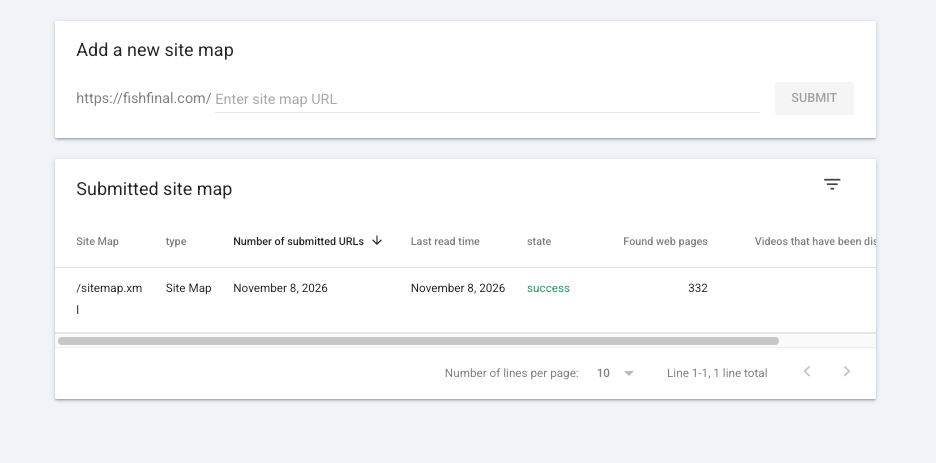
1. Do not resubmit the Sitemap frequently!
Many webmasters, once they modify their code, rush to Google Search Console (GSC) or Bing Webmaster Tools to resubmit sitemap.xml.This is completely wrong. A Sitemap is only a guiding map; it is only responsible for declaring a URL list. As long as your URL list has not increased or decreased, you do not need to resubmit it. Frequent submissions may instead reduce the trust that search engines place in the Sitemap.
2. The correct way to ask for updates: URL check
If you want a page with changed tags to be indexed immediately, do not bother with the Sitemap; instead, use [URL Inspection]:
Open Google Search Console (or Bing).
at the topWebsite Check In the input box, paste what you just modified.
hreflangthe specific English page URL, click Request indexing.Paste the corresponding Chinese page URL again and perform the same operation once.
This can force the crawler to recrawl these two pages as quickly as possible and immediately detect your changes.
3. Verify whether it takes effect
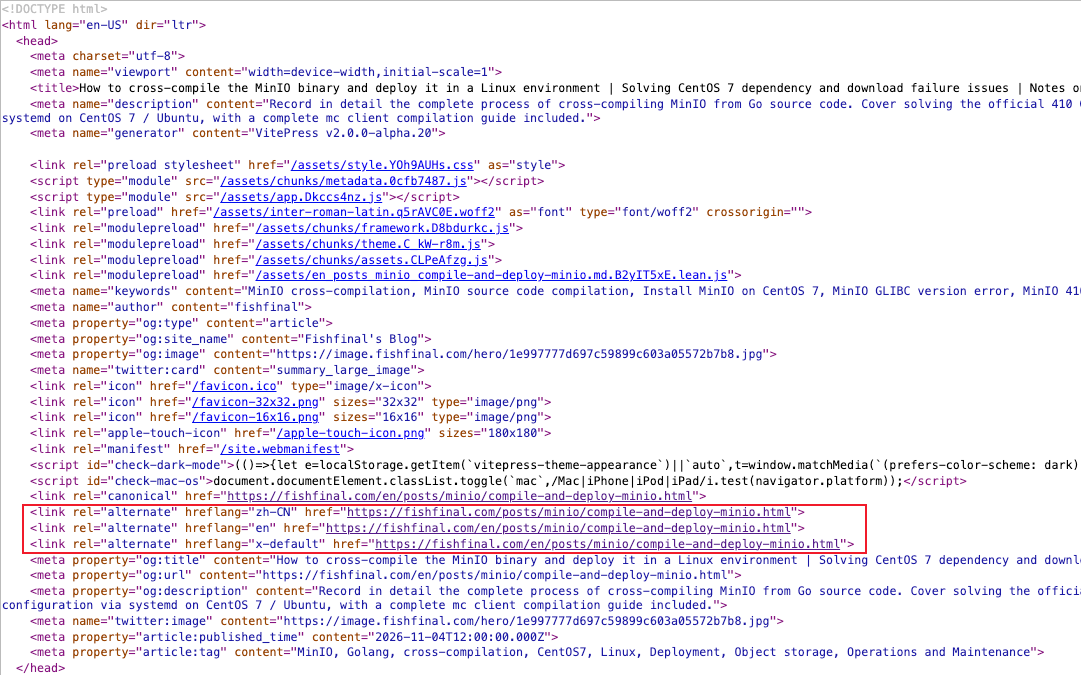
After waiting a day or two, right-click on the online page and select [View Page Source], then search hreflang, confirm whether these lines of code appear as expected in <head> in, and the absolute path is completely correct.
Summary
Building a multilingual site is extremely expensive, do not let carelessness ruin your SEO efforts. Spend 10 minutes to hreflang Configure it properly and strictly follow the principle of bidirectional mutual linking; only then can your multilingual traffic truly flow continuously.