English
How to cross-compile the MinIO binary and deploy it in a Linux environment

Background pain points
In daily operations or development, when deploying the object storage service MinIO, people now often encounter the dilemma of "no package available," mainly due to the following three pain points:
The official direct link returns 410 Gone.: In the early days, people were accustomed to directly through
wget https://dl.min.io/server/minio/release/linux-amd64/minioDownload, but the official side has now completely removed this direct download path, and requests will directly return an error.410 Gone.GitHub Releases has only source code: When you want to go to GitHub to find compiled binary backups, you will find that the official has changed all Release tags to Source Only(Source code only). As the terminal prompt indicated when you switched Tag:
point to source only releases.GLIBC dependency conflict Even if you find the latest official binary package through other channels, it will still depend on
GLIBC_2.28+, while old servers (such as CentOS 7 Only includedGLIBC_2.17) It will throw an error directly at runtime:
bash
minio: /lib64/libc.so.6: version `GLIBC_2.28' not foundUltimate Solution Since no package is available, we’ll build our own. With the help of Go’s Static compilation For this feature, we directly pull the source code and cross-compile locally (or on any machine) a self-contained build with all dependencies.minio binary file. The file compiled this way is statically linked (static linking), does not depend on any system libraries of the host machine, and is fully compatible with all Linux distributions such as CentOS 7 and Ubuntu 18.04/20.04/22.04.
1. Compilation Environment Preparation
To compile, you need a machine that has installed Go language environment machine (which can be a development machine, a Mac, WSL on Windows, or even another Linux server).
1. Install the Go environment (using Linux as an example)
bash
# Download the Go archive (adjust the version number according to the latest official version)
wget https://go.dev/dl/go1.23.2.linux-amd64.tar.gz
tar -C /usr/local -xzf go1.23.2.linux-amd64.tar.gz

# Configure environment variables
echo 'export PATH=$PATH:/usr/local/go/bin' >> /etc/profile
echo 'export GOPROXY=https://goproxy.cn,direct' >> /etc/profile # Recommended to configure a proxy in China
source /etc/profile

# Verification
go version
II. Pull the source code and compile
1. Clone the source code and switch to the specified version
To ensure stability, it is recommended to switch to an explicit Release tag (Tag).
bash
# Clone the official repository
git clone https://github.com/minio/minio
cd minio

# View available tags and switch (here, using version 2025-10-15 as an example)
# Note: After switching, you are in a detached HEAD state; this is normal.
git checkout RELEASE.2025-10-15T17-29-55Z
2. Cross-compile to generate a binary file
The official MinIO repository includes complete dependencies, so we can use it directly.go build Compile using the command. For Linux 64-bit systems, execute the following command:
bash
# Specify the target system as Linux, with architecture amd64
GOOS=linux GOARCH=amd64 go build -o minio main.go
Compilation Tips:
If you need to compile for the ARM architecture (e.g., Raspberry Pi, Kunpeng servers), will
GOARCH=amd64Change toGOARCH=arm64.If you compile directly on a Mac (M-series chip), you can also use the above command to complete cross-compilation.
If you want to reduce the file size, you can add before the command
-ldflags="-s -w"Remove debug information, for example:GOOS=linux GOARCH=amd64 go build -ldflags="-s -w" -o minio main.go.
3. Verify binary file attributes
After compilation is complete, check the generated files:
bash
file minioYou will see the following output:
minio: ELF 64-bit LSB executable, x86-64, version 1 (SYSV), statically linked...
see statically linked That means it was successful. Since it is statically linked, it will not be affected by the old version of GLIBC on CentOS 7.
III. Deployment in a Linux Environment (Using CentOS 7 as an Example)
Whether you are using CentOS 7 or Ubuntu, the following deployment steps are fully applicable.
1. Install the binary file
bash
# Copy the compiled MinIO to the system executable directory.
cp minio /usr/local/bin/minio
chmod +x /usr/local/bin/minio

# Test whether it is running normally
minio --version
2. Create a dedicated user and data directory
For security reasons, do not run MinIO as root.
bash
# Create system user
groupadd -r minio-user
useradd -M -r -g minio-user minio-user

# Create a data storage directory
mkdir -p /data/minio
chown -R minio-user:minio-user /data/minio
3. Configure environment variables
Create configuration file /etc/default/minio:
bash
cat > /etc/default/minio <<'EOF'
# Administrator account and password (password at least 8 characters)
MINIO_ROOT_USER=admin
MINIO_ROOT_PASSWORD=Admin@123456

# Data storage directory
MINIO_VOLUMES="/data/minio"

# Port configuration: 9000 is the S3 API port, 9001 is the Web console port
MINIO_OPTS="--address :9000 --console-address :9001"
EOF
4. Configure the Systemd Service
Create service file /etc/systemd/system/minio.service:
bash
cat > /etc/systemd/system/minio.service <<'EOF'
[Unit]
Description=MinIO
Documentation=https://min.io/docs/minio/linux/index.html
Wants=network-online.target
After=network-online.target
AssertFileIsExecutable=/usr/local/bin/minio

[Service]
WorkingDirectory=/usr/local
User=minio-user
Group=minio-user
EnvironmentFile=-/etc/default/minio
ExecStartPre=/bin/bash -c "if [ -z \"${MINIO_VOLUMES}\" ]; then echo 'Variable MINIO_VOLUMES not set in /etc/default/minio'; exit 1; fi"
ExecStart=/usr/local/bin/minio server $MINIO_OPTS $MINIO_VOLUMES
Restart=always
LimitNOFILE=65536
TimeoutStopSec=infinity
SendSIGKILL=no

[Install]
WantedBy=multi-user.target
EOF
5. Start the service
bash
# Reload systemd
systemctl daemon-reload

# Set to start on boot
systemctl enable minio

# Start the service
systemctl start minio

# View status
systemctl status minio
Normally, it should be similar to the following status information.
● minio.service - MinIO
   Loaded: loaded (/etc/systemd/system/minio.service; enabled; vendor preset: disabled)
   Active: active (running) since Wed 2026-11-04 12:01:55 CST; 4s ago
     Docs: https://min.io/docs/minio/linux/index.html
  Process: 7231 ExecStartPre=/bin/bash -c if [ -z "${MINIO_VOLUMES}" ]; then echo 'Variable MINIO_VOLUMES not set in /etc/default/minio'; exit 1; fi (code=exited, status=0/SUCCESS)
 Main PID: 7233 (minio)
    Tasks: 14
   Memory: 73.2M
   CGroup: /system.slice/minio.service
           └─7233 /usr/local/bin/minio server --address :9000 --console-address :9001 /data/minio

Nov 04 12:01:55 localhost.localdomain systemd[1]: Started MinIO.
Nov 04 12:01:56 localhost.localdomain minio[7233]: INFO: Formatting 1st pool, 1 set(s), 1 drives per set.
Nov 04 12:01:56 localhost.localdomain minio[7233]: INFO: WARNING: Host local has more than 0 drives of set. A host failure will result in data becoming unavailable.
Nov 04 12:01:56 localhost.localdomain minio[7233]: MinIO Object Storage Server
Nov 04 12:01:56 localhost.localdomain minio[7233]: Copyright: 2015-2026 MinIO, Inc.
Nov 04 12:01:56 localhost.localdomain minio[7233]: License: GNU AGPLv3 - https://www.gnu.org/licenses/agpl-3.0.html
Nov 04 12:01:56 localhost.localdomain minio[7233]: Version: DEVELOPMENT.GOGET (go1.27.3 linux/amd64)
Nov 04 12:01:56 localhost.localdomain minio[7233]: API: http://192.168.9.238:9000  http://172.17.0.1:9000  http://127.0.0.1:9000
Nov 04 12:01:56 localhost.localdomain minio[7233]: WebUI: http://192.168.9.238:9001 http://172.17.0.1:9001 http://127.0.0.1:9001
Nov 04 12:01:56 localhost.localdomain minio[7233]: Docs: https://docs.min.io
6. Allow through firewall
bash
firewall-cmd --permanent --add-port=9000/tcp
firewall-cmd --permanent --add-port=9001/tcp
firewall-cmd --reload
bash
ufw allow 9000/tcp
ufw allow 9001/tcp
ufw reload
7. Verify firewall rules
bash
# View currently allowed ports
firewall-cmd --list-ports

# View all firewall rules (more detailed)
firewall-cmd --list-all

# Separately confirm whether 9000 / 9001 have been allowed.
firewall-cmd --query-port=9000/tcp
firewall-cmd --query-port=9001/tcp
bash
# View firewall status and rule list
ufw status

# View the numbered list of rules (for easy deletion later)
ufw status numbered

# Separately confirm whether 9000 / 9001 have been allowed.
ufw status | grep -E '9000|9001'
Description:
firewall-cmd --query-portwill returnyes/no, directly indicate whether the port has been allowed;ufw statuswill list all rules, in conjunction withgrepQuickly filter out the target port;If the firewall is not enabled,
ufw statuswill displayStatus: inactive, at this time the rule will not take effect, you can first useufw enableEnable.
IV. Access and Verification
Open the browser and visit http://<你的服务器IP>:9001:

Username:
adminpassword:
Admin@123456
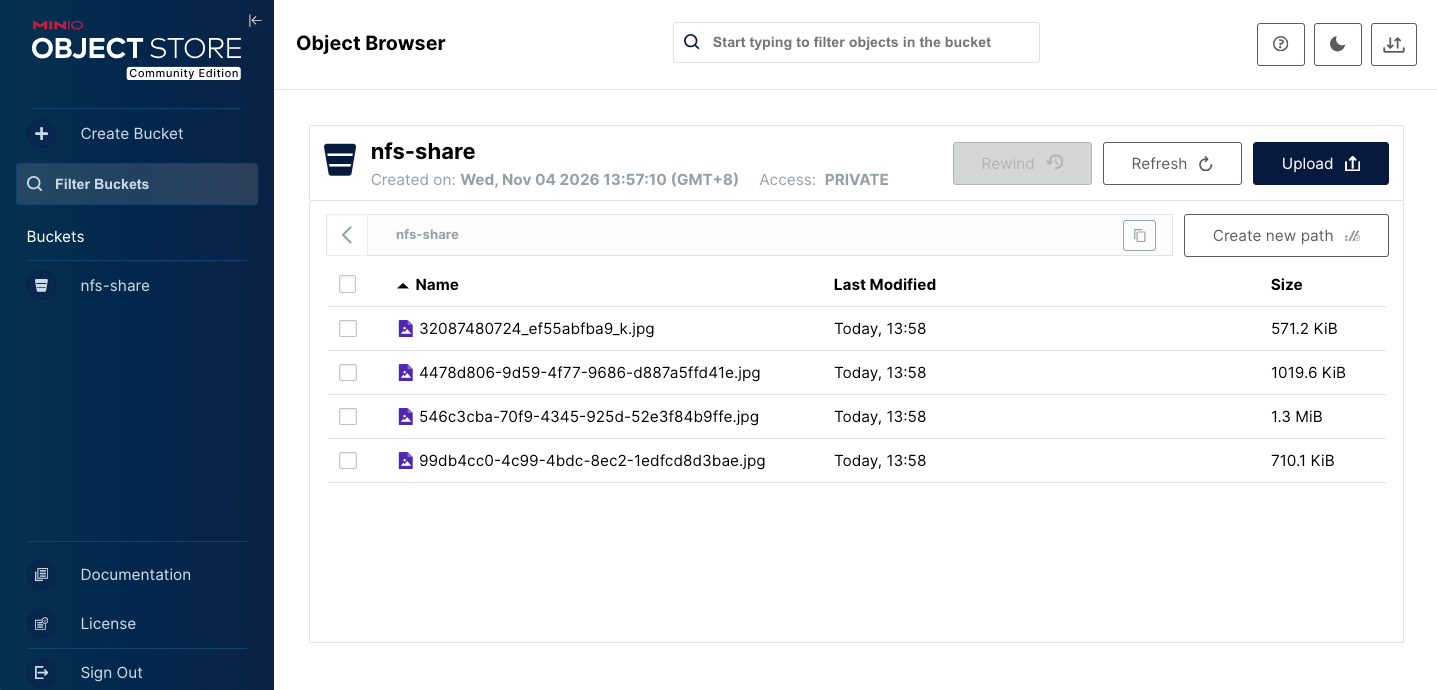
After logging in, you will see the brand-new MinIO console. Similar to the interface below, you can see that I have already created a nfs-share Object bucket, and uploaded multiple images through batch upload.
V. Additional: Install the MinIO Client (mc)
mc(MinIO Client) is a Independent open-source repository(github.com/minio/mc), used to manage S3-compatible object storage. Like the server side, the latest officially released mc The binary file will report an error when run directly on CentOS 7 because it depends on a newer version of GLIBC.
Fortunately,The official MinIO GitHub Releases page directly provides precompiled artifacts for multiple platforms and formats (including .rpm,.deb and standalone binary files) These installation packages have built-in static linking and are fully compatible with old Linux systems.
You can go directly to minio/mc Releases Download the latest from the page .rpm package (e.g.mcli-20250813083541.0.0-1.x86_64.rpm), then through yum Direct installation:
bash
# Use yum to install the downloaded rpm package.
yum install -y ./mcli-20250813083541.0.0-1.x86_64.rpm
After installation is complete, verify whether the installation was successful (note: the installation package may register the command as mc or mcli, depending on the specific packaging specification):
bash
# Try running the mc command
mc --version
If the output is similar to the following, it indicates mc Available commands:
txt
mc version RELEASE.2022-06-11T21-10-36ZIf it prompts that it cannot be found mc Command, please try to use.mcli:
bash
# Try running the mcli command
mcli --version
Expected output is similar to the following (including detailed build information):
txt
mcli version RELEASE.2025-08-13T08-35-41Z (commit-id=7394ce0dd2a80935aded936b09fa12cbb3cb8096)
Runtime: go1.24.6 linux/amd64
Copyright (c) 2015-2025 MinIO, Inc.
License GNU AGPLv3 <https://www.gnu.org/licenses/agpl-3.0.html>
(Note: If your system does not support RPM packages, or you only need a pure binary file, you can look on the Releases page linux-amd64 the raw binary file, directly after downloading chmod +x Grant execute permission and it can be used.)
Configure and use mc
After installation is complete, configure mc Use an alias to manage the newly deployed MinIO server:
bash
# Set alias (local is your alias)
mc alias set local http://127.0.0.1:9000 admin Admin@123456
Under normal circumstances, you will see initialization logs similar to the following:
txt
mc: Configuration written to `/root/.mc/config.json`. Please update your access credentials.
mc: Successfully created `/root/.mc/share`.
mc: Initialized share uploads `/root/.mc/share/uploads.json` file.
mc: Initialized share downloads `/root/.mc/share/downloads.json` file.
Added `local` successfully.
After configuration is complete, test the connection and view the storage bucket:
bash
mc ls localSummary
Faced with official direct links returning 410 errors, GitHub retaining only source code, and the GLIBC dependency hell on old systems (such as CentOS 7), embracing source compilation for open-source software is currently the most thorough and once-and-for-all solution. Go's excellent static compilation features make the generated binaries truly achieve compile once, run anywhere. It is recommended that if upgrades are needed later, this process also be reused directly to build packages of new versions from source.