
English
Cloudflare R2 incomplete multipart upload (Ongoing Multipart Upload) cannot be deleted—what should I do?

Encountered an undeletable gray "Ongoing Multipart Upload" ghost file in the Cloudflare R2 console? This article documents the complete hands-on process, from failed deletion attempts with rclone to forcing cleanup by configuring Object Lifecycle Rules.
I. Problem symptom: "ghost files" appear on the webpage
When using Cloudflare R2 as object storage and pairing it with rclone for large file uploads, I encountered something that is extremely uncomfortable for people with OCD:
In the Web console's kubernetes In the directory, a gray file appeared (for example -offline-full.tar.gz).
Its state is extremely bizarre:
Type: displayed as
Ongoing Multipart Upload.Tooltip: When the mouse hovers, a warning prompt will pop up: "This is a multipart upload that has not yet been completed or aborted.
No-action menu: its right side No that regular files have
...Operation menu; you cannot click Delete directly.
Strangely, according to my local R2 usage calculation, this file doesn't actually take up the space I've already accounted for, yet it's stuck in the webpage list like a "ghost."

II. Conventional Methods Hit a Snag: rclone's Futile Attempts
As a user accustomed to the command line, I immediately tried to solve the problem with rclone, but all attempts failed.
1. rclone ls cannot find the entity
Execute rclone ls Check that directory; the file cannot be found at all in the list.
bash
rclone ls cloudflare-r2:fishfinal-dl/kubernetes/Result: There is only normal content in the output.calico and k8s offline package,-offline-full.tar.gz It is not in the list at all.
Cause analysis: It is essentially not a "complete object (Object)" but a set of parts (Parts), so conventional object listing commands cannot capture it.
2. Cannot find UploadId when calling the API
Next, I try to use rclone's low-level S3 API to find identifiers of incomplete uploads (UploadId):
bash
rclone backend list-multipart-uploads cloudflare-r2:fishfinal-dl/kubernetes/Result: returned an empty list []. When querying with the subdirectory path included, R2's API failed to recognize this orphaned residual.
3. rclone delete performs a "no-op"
Finally, with a give-it-a-try mindset, I directly used the path to execute it.delete:
bash
rclone delete cloudflare-r2:fishfinal-dl/kubernetes/-offline-full.tar.gzResult: After the command was executed, the terminal reported no errors and indicated that it completed normally. But when I refreshed the web page, that gray ghost file not moving an inch.
At this point I realized that this was not “deleting an object” in the ordinary sense at all, but rather required triggering Abort upload.
III. Key Breakthrough: R2's Lifecycle Rules (Lifecycle Rules)
After ineffective attempts with command-line tools, I turned my attention to Cloudflare R2's own console Bucket settings. In Settings -> Object Lifecycle Rules In it, I found the key configuration to break the deadlock:
Default Multipart Abort Rule(Default shard abort rule)
Cloudflare R2 introduced an automatic cleanup mechanism for fault tolerance and disaster recovery.By default, if a multipart upload task is not completed or aborted within 7 days, R2's backend servers will automatically abort it and release the occupied storage space.
My solution:
Since the default time is 7 days, and my stuck shard has already existed for almost 5 days, I decided to directly issue a forced reclamation command.
I click Edit to change the lifecycle rule's automatic abort time from 7 day(s) Temporarily changed to 1 day(s).
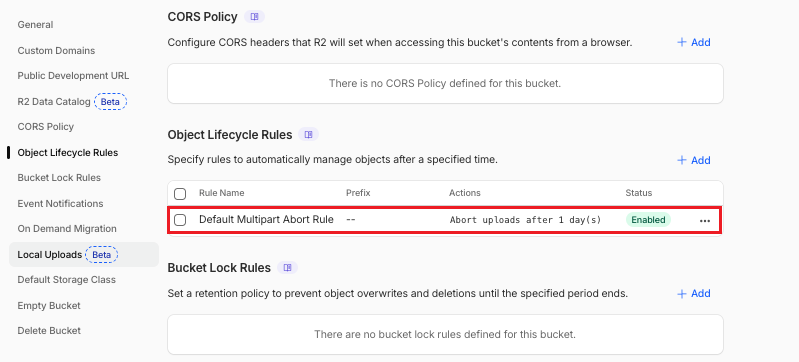
IV. One Strike, Sure Hit! The File Disappears
After the new rules were saved and took effect, a miracle happened.
Because that shard had already existed for well over 1 day, R2's backend detected a rule change and immediately performed a forced abort operation on this unfinished task.
I return to the Objects page again and click the refresh button in the top right corner, that gray one that has been there for days -offline-full.tar.gz Disappeared instantly without a trace, and the entire directory became incredibly clean!
V. Summary: Advice for People Who Encounter the Same Problem
If you've also encountered gray items in R2 that can't be deleted Ongoing Multipart Upload For residual files, you can refer to the following three solutions:
Buddhist-style waiting (most worry-free): Because R2 has by default 7 days the mandatory cleanup rules. Once 7 days have passed, the backend will automatically complete the cleanup, and you can choose to ignore it.
Manual forced cleanup (to satisfy OCD): Like me, in Object Lifecycle Rules in it, temporarily change the automatic abort time to
1 dayThis will cause the R2 system to immediately execute on the timed-out shardAbortOperation.🌟 Words of experience: Please be sure to remember to change it back! After the cleaning is complete,It is recommended to immediately change the rule back to the default
7 day(s).
Why? If you usually need to transfer large offline packages of hundreds of megabytes or even several GB, and if the network is interrupted midway, set it to 1 day It means that when you want to resume the transfer the next day, all the previous chunks are gone, and you need to Upload again from the beginning., which is a huge waste of time, network, and resources.
As a daily user of R2, reasonably configure the lifecycle of Multipart Abort Rule Not only to fix an occasional UI bug, but also as a safety line of defense in geek operations and maintenance. I hope this pitfall record can help you save troubleshooting time!